Airspeed Notetaker — Google Meet “Potential Risk” FAQ
Last updated: May 20, 2026
Why is the Airspeed bot being flagged as a “potential risk”?
Google recently updated how it handles third-party bots in Google Meet. As a result, all bots (including Airspeed) may be flagged as “with potential risk” by default.
This is a Google-wide change and not specific to Airspeed.
Is it safe to admit the Airspeed bot?
Yes — the Airspeed Notetaker is safe to admit.
You can verify this by:
Checking the bot name (e.g. “[Your Company] Notetaker”)
Confirming it matches your organization’s expected naming
Why is the default action set to “Deny”?
Google Meet now defaults to “Deny” for bots flagged as potential risks.
This is part of their updated security policy and applies to all third-party meeting assistants.
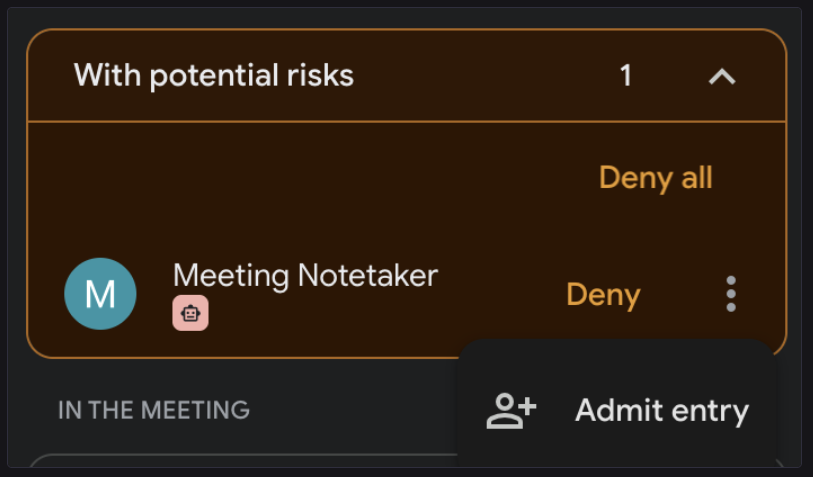
How do I manually admit the Airspeed bot?
When the bot requests to join:
Locate the join request notification in Google Meet
Click the three dots (⋮) next to the request
Select “Admit”
Once admitted, the bot will join and begin recording as expected.
Will this happen for every meeting?
Yes, for now this may occur in meetings where the bot joins.
We recognize this adds friction and are actively working on a solution to streamline the experience.
Is this a permanent change?
No — this is expected to be temporary.
Google recently introduced these changes, and we are exploring ways to improve the experience and reduce manual steps.
What should I do if the bot doesn’t join?
Check if the request was automatically denied
Manually admit the bot using the steps above
Ensure your recording settings are correctly configured
If issues persist, please reach out to support.