Forecasting
Last updated: June 11, 2026
Forecasting in Airspeed helps reps commit to a number for the current period, backed by the deals in their pipeline. Managers roll those submissions up into a team forecast. Sales leaders and CROs can review forecasts across the org, drill into deal-level detail, and compare submissions against live CRM data.
Forecasting requires a connected CRM (HubSpot or Salesforce). To submit a forecast, you must also be set up as a CRM user in Airspeed.
Note: If you do not see Forecasts in the left navigation, forecasting may not be enabled for your organization. Contact your admin or reach out to us at support@glyphic.ai.
Admins configure fiscal periods, forecast categories, quotas, and cadence defaults in Settings. For that setup, see Forecasting Setup: Fiscal Year, Categories & Quotas.
Go to Forecasts in the left navigation to review submissions. Reps submit forecasts from the Deals page.
For sales reps
Overview
As a rep, your typical workflow is:
Filter your deals on the Deals page for the period you are forecasting.
Select the deals that belong in your forecast.
Submit category amounts and a forecast total for the current period.
Review past submissions on the Forecasts page under My Forecast History.
Forecast categories (for example Commit, Best Case, Pipeline) come from your CRM. Your admin controls which categories appear in the chart and which amounts you can edit at submission time. See the setup article linked above for category configuration.
Submit a forecast from Deals
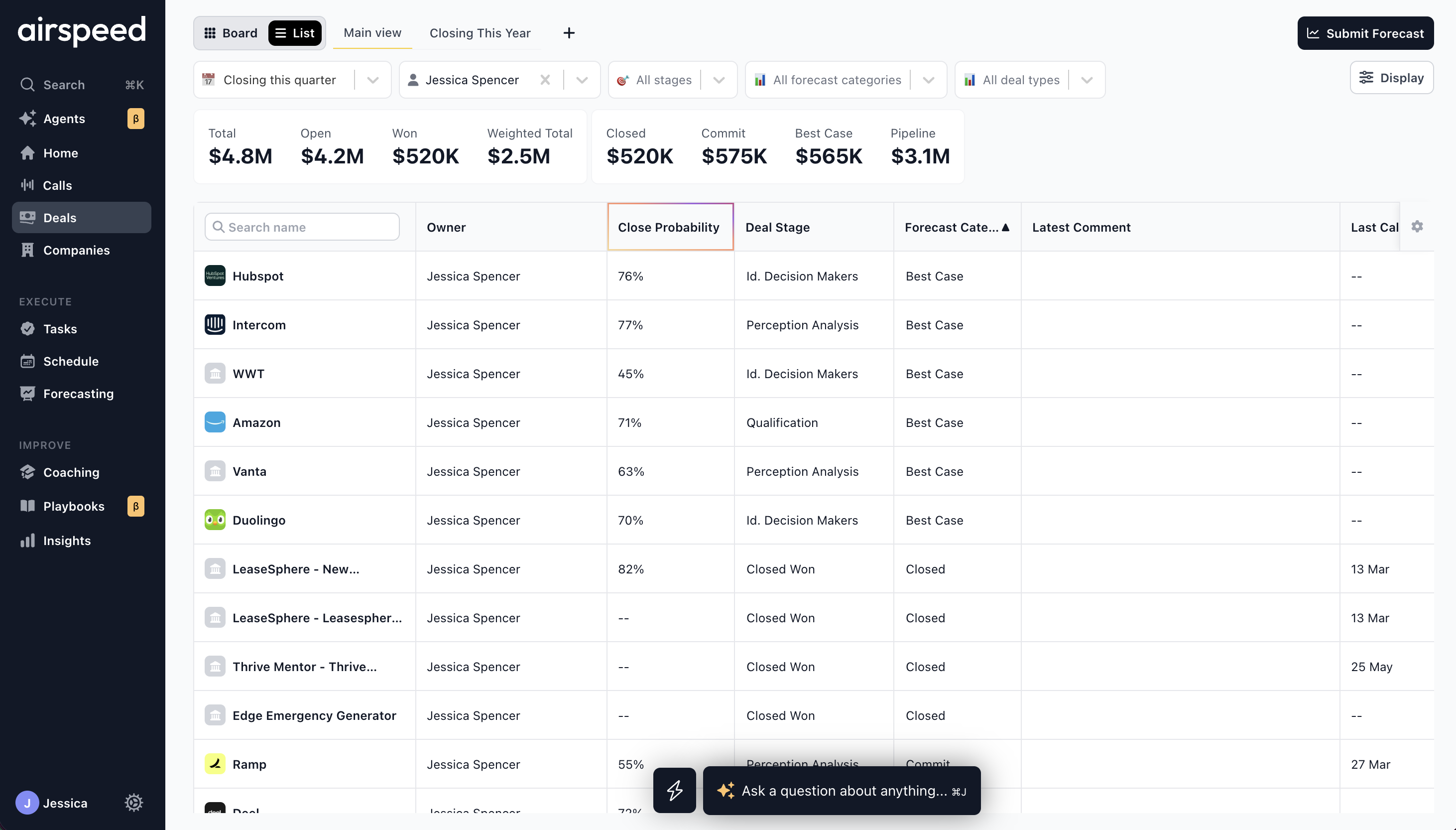
Most reps submit from Deals in List view. Board view does not support deal selection for forecasting.
Go to Deals and switch to List view.
Use the filters to narrow your pipeline:
Close date — limit deals closing in a given month, quarter, or custom range.
Owner — filter by rep or team.
Pipeline / stage — focus on a specific part of your funnel.
Forecast category and Deal type.
You can also hide deals with no recorded calls from display settings.
Click Submit Forecast in the top right corner. Airspeed applies a close-date filter for your effective forecast period and scopes the view to your deals.
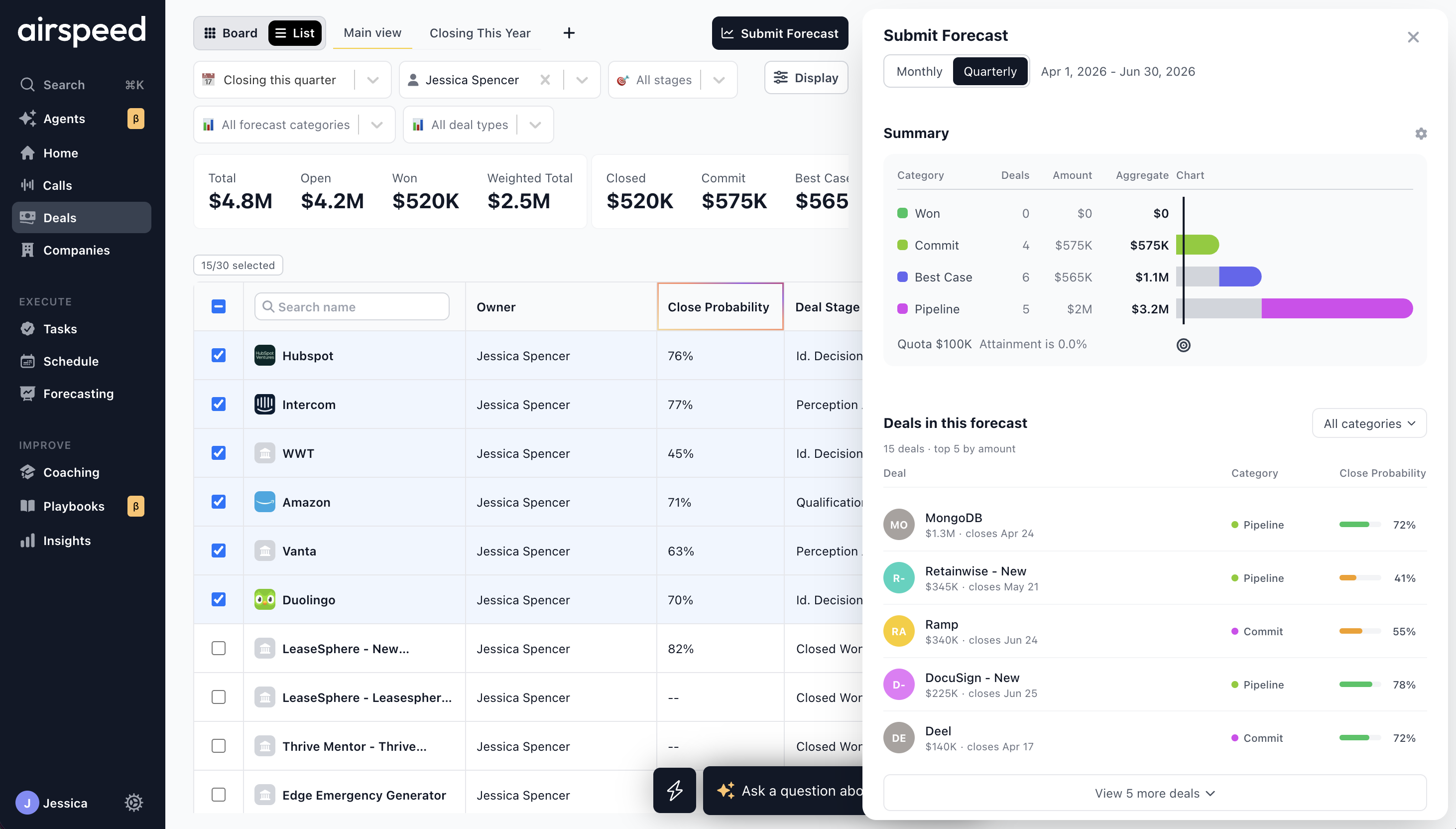
Select deals using the row checkboxes. A counter shows how many deals are selected (for example, 12/45 selected). If you already submitted for the current period, your previous deal selection is pre-selected when you reopen the panel.
Review the submit panel on the right:
Monthly / Quarterly — switch cadence if needed (see Forecast cadences below).
Summary — chart of selected deals by forecast category, compared to your quota when one is set.
Deals in This Forecast — your selected deals sorted by amount, with forecast category badges and close probability scores. Filter by category or load more deals in batches.
Forecast — enter amounts for each editable category and your overall Forecast total. Category fields auto-fill from the sum of selected deals; adjust as needed.
Comment — optional context for your manager.
Click Submit Forecast.
Note: You must be a CRM user to submit a forecast. If the Submit Forecast button is disabled, confirm your account is linked to a CRM user record.
Close probability
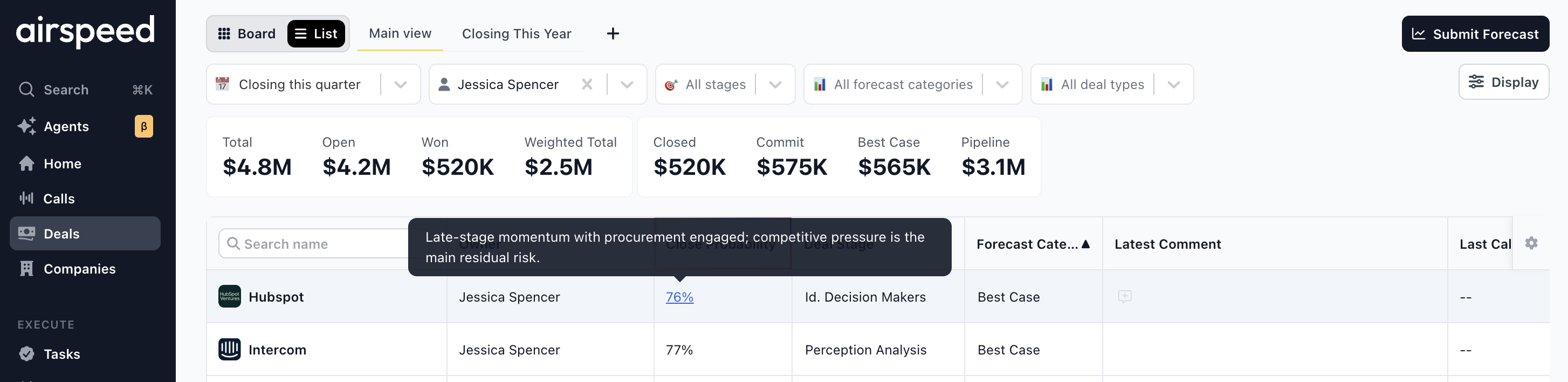
Close probability is an AI-generated score from 0–100 that reflects how likely a deal is to close, based on signals such as engagement, stakeholder coverage, deal momentum, and buyer conviction. Hover over a score to see the reasoning.
Where to find it
Deals table — enable the Close Probability column in display settings (it is hidden by default). Click a score to open the company page Insights tab for that deal.
Company page — select a deal and open the Insights tab for the full score and explanation.
Submit Forecast panel — each deal in Deals in This Forecast shows a probability bar and percentage.
Airspeed calculates separate time horizons: a monthly score (likelihood of closing by the end of the current calendar month) and a quarterly score (likelihood of closing by the end of the current calendar quarter). The monthly score is never higher than the quarterly score. The Deals table and submit panel show the primary score for the context you are in.
Review your forecast history
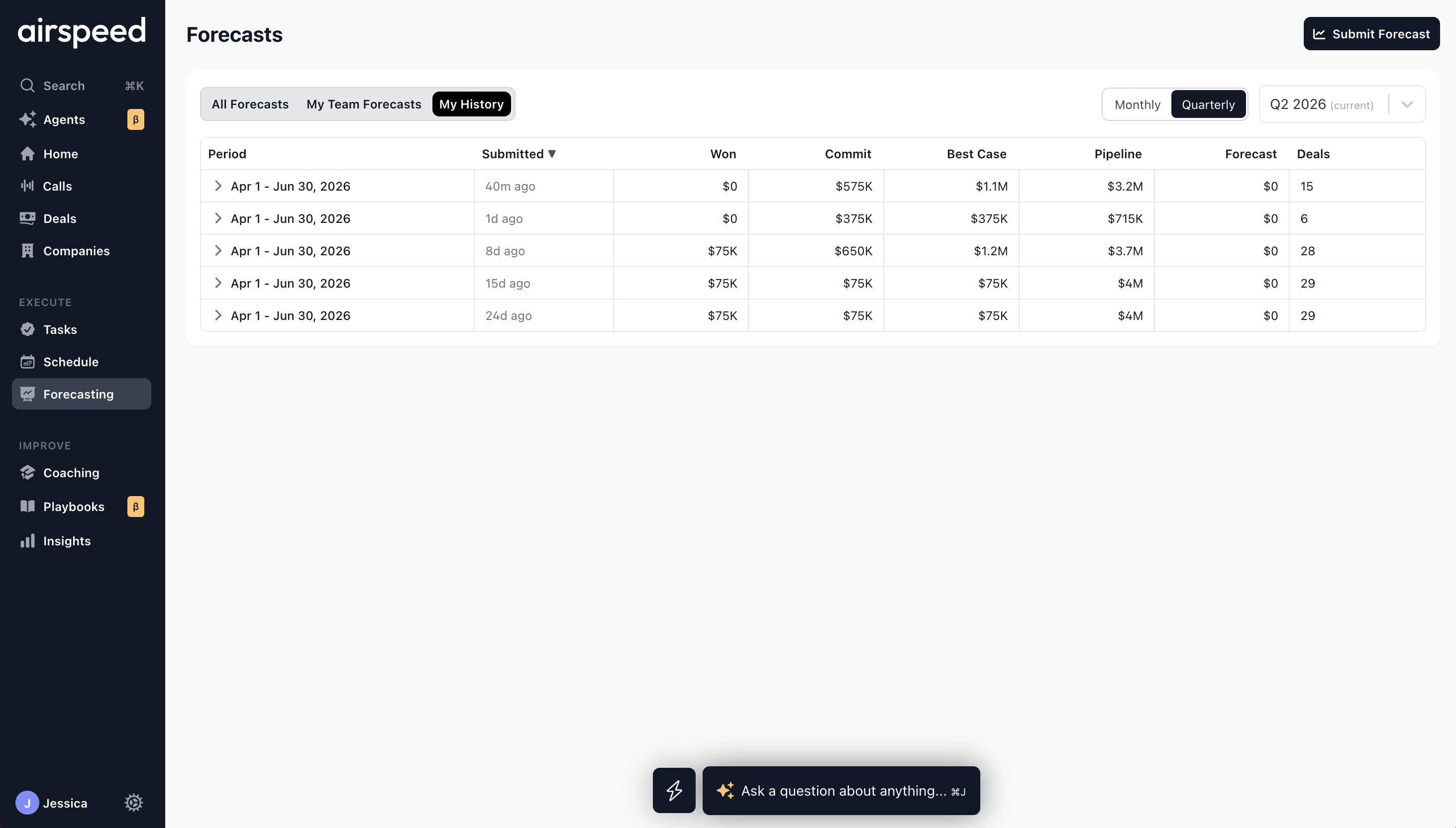
Go to Forecasts and open the My Forecast History tab (managers also see My History alongside team tabs).
Use the Monthly / Quarterly toggle and period dropdown to filter submissions. The table shows:
Period — the forecast window.
Submitted — when you last submitted for that period.
Won — closed-won amount included in the submission.
Category columns — amounts per CRM forecast category (for example Commit, Best Case).
Forecast — your committed forecast total.
Deals — number of deals in the submission.
Click a row to expand it. The expanded view shows:
Last submitted forecast — category breakdown chart from your submission.
Comments — notes you included when submitting.
Live deal view — deals from your submission, grouped by forecast category, loaded with current CRM data.
For managers, sales leaders, and CROs
View team forecasts
Open Forecasts. The tabs available depend on your role:
Managers — All Forecasts, My Team Forecasts, and My History.
Admins and other users with org-wide access — All Forecasts and My History.
All Forecasts shows the full organization hierarchy. My Team Forecasts is limited to your direct and indirect reports.
Use the Monthly / Quarterly toggle and period selector to choose which forecast period to review. The table includes a Total row at the top that aggregates team numbers.
Columns
User — rep or manager name.
Submitted — when the forecast was last submitted.
Won — closed-won amount.
Category columns — amounts per CRM forecast category.
Forecast — committed forecast total.
Quota — assigned target for the period.
Attainment — percentage of quota achieved (green at 100% or above).
Coverage — pipeline coverage ratio (for example, 2.5x).
Deals — number of deals in the submission.
Click a row to expand it for chart, comment, and live deal detail (see below). Rows with a team icon represent manager roll-ups — expand them to load nested forecasts from their reports. Indented rows show the reporting hierarchy.
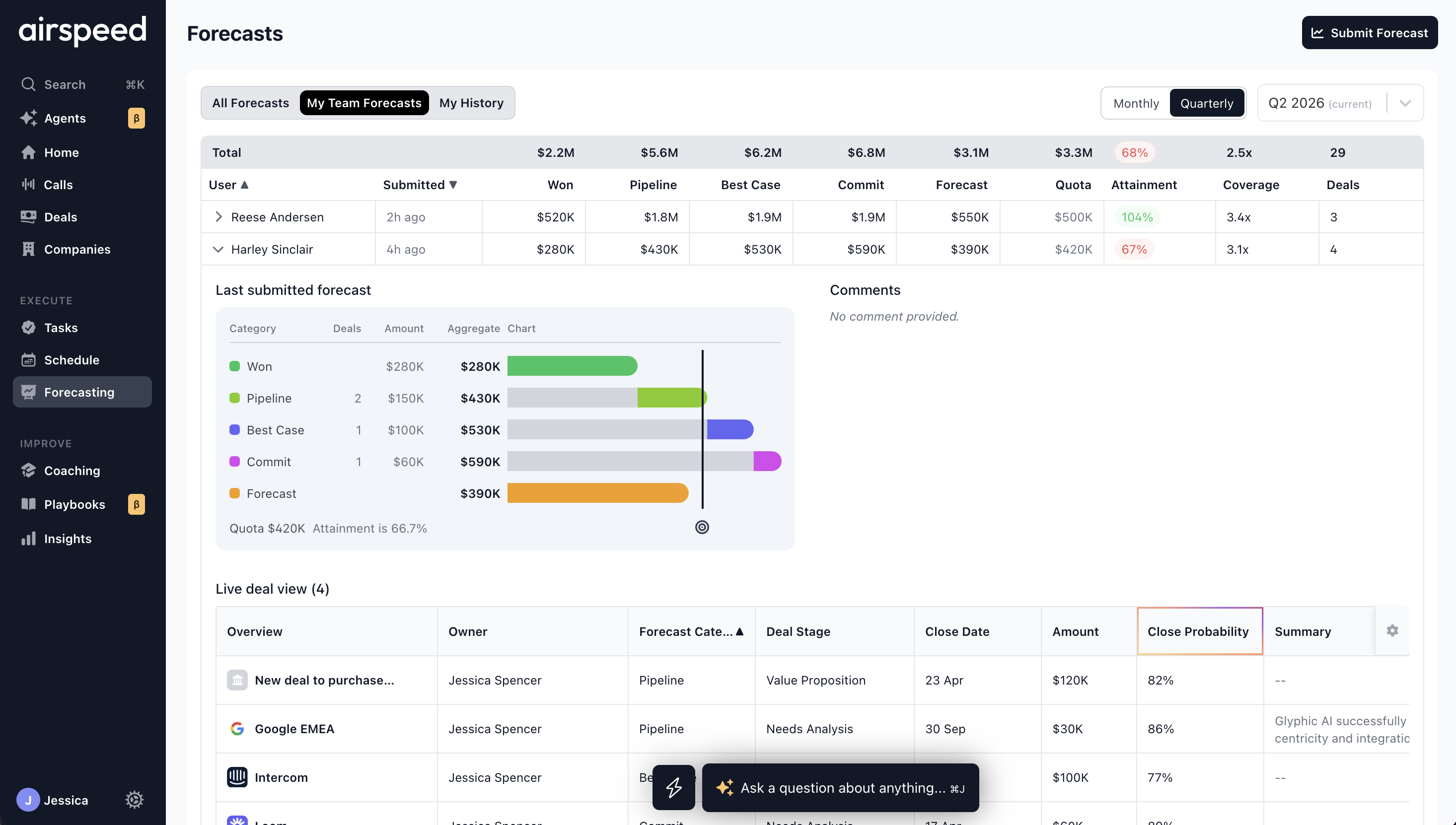
Expanded forecast detail and live deal table
When you expand a forecast row, you see up to three sections:
Last submitted forecast — a category breakdown chart from the submission, compared to quota where available.
Comments — notes the rep or manager included at submission time, with a relative timestamp.
Live deal view — a collapsible deal table that loads current CRM data for the deals in that forecast (not just the snapshot from submission day). Deals are grouped by forecast category. Each group header shows the category name, deal count, and total amount. Expand or collapse groups as needed.
Deal table columns include Deal (links to the company page), Owner, Summary, Activity, Latest Comment, Last Call, Next Call, Qualification Scores (when configured), Deal Stage, Close Date, Amount, Deal Type, and Forecast Category.
Use the live deal view to sanity-check a rep's forecast against today's pipeline — for example, deals that moved stage, changed amount, or shifted forecast category since submission.
Submit a manager rollup forecast
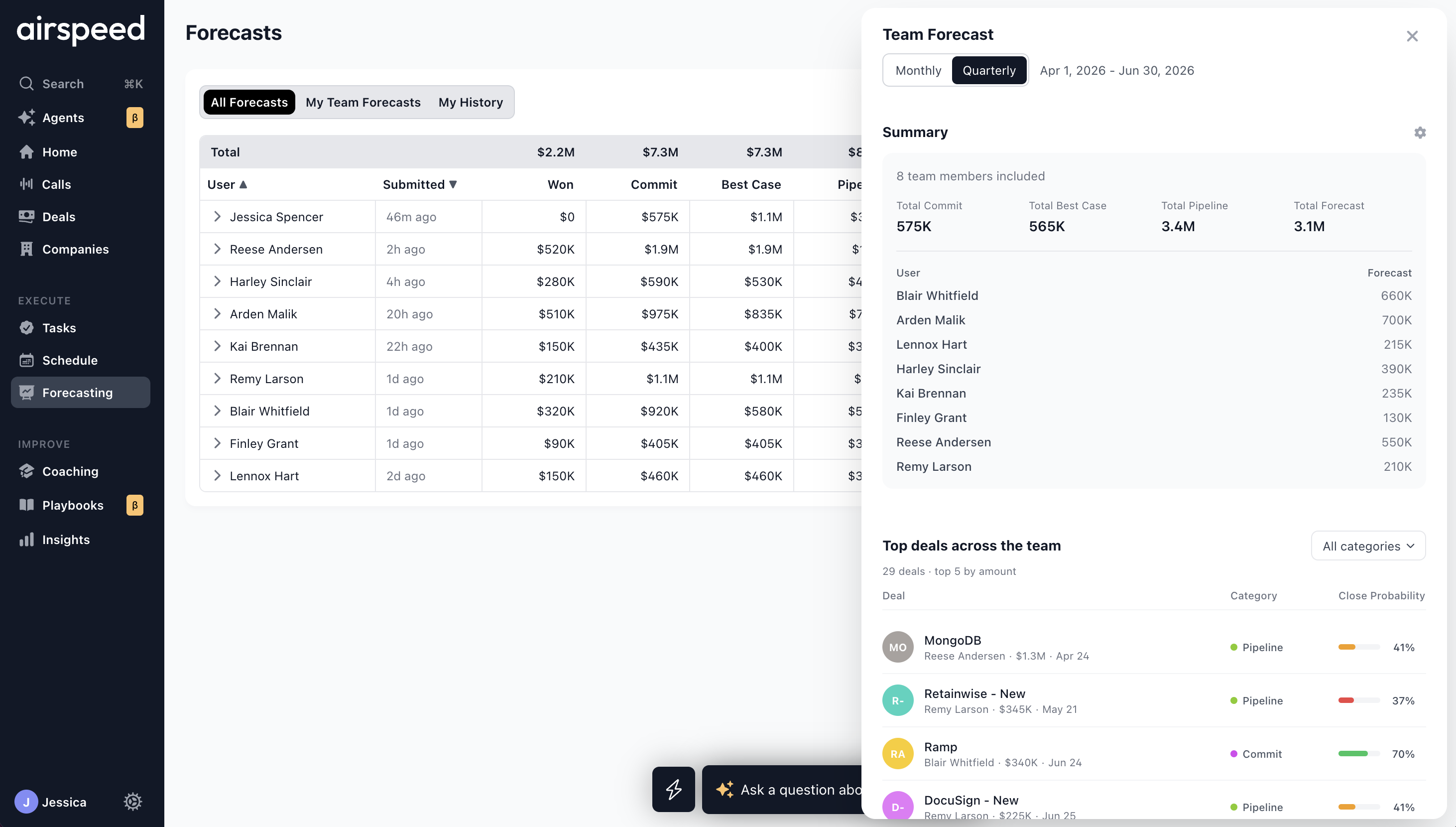
Managers submit a team-level forecast from the Forecasts page. Click Submit Forecast in the page header to open the Team Forecast panel.
The panel pre-selects your effective cadence and the current forecast period. It includes:
Summary — count of team members included and rolled-up totals per category. Below that, a list of each rep's submitted forecast amount.
Top Deals Across the Team — the largest open deals across included submissions, sorted by amount. Each row shows the deal owner, amount, close date, forecast category, and close probability.
Forecast amounts — category fields and the overall Forecast total, pre-filled from the team rollup. Edit before submitting.
Comment — optional notes for leadership.
Click Submit Forecast to save your manager rollup. The submission rolls up the rep forecasts included for that period.
Note: The Submit Forecast button is disabled when:
There is no current forecast period for your team's cadence.
You are viewing a period other than the current one.
No reps on your team have submitted forecasts for the matching period yet.
Forecast cadences
Your organization has a default forecast cadence (monthly or quarterly). Admins can also set a different default cadence per manager team. That default is pre-selected when you open Submit Forecast, but you can switch between Monthly and Quarterly in the submit panel or on the Forecasts page before submitting or reviewing.
Airspeed does not block submissions on a cadence that differs from your team's default. Managers enforce consistency through their own process — for example, expecting monthly commits from the team.
Important: Rep forecasts only roll into a manager's team submission when the period start and end dates match exactly. Monthly rep submissions do not automatically aggregate into a quarterly manager forecast.
For full detail on cadence defaults and per-manager overrides, see :page_facing_up: Forecasting Setup: Fiscal Year, Categories & Quotas (section Per-team default forecast period).
FAQ
Why don't I see Forecasts in the navigation?
Forecasting is enabled per organization. If it is missing from your nav, contact your admin or reach out to support@glyphic.ai.
Why can't I submit a forecast?
You must be linked as a CRM user. Confirm your CRM connection and that your email matches a user in HubSpot or Salesforce.
Why can't I submit a team forecast?
Your reps need to submit forecasts for the same period (matching start and end dates) before you can roll up. The Submit Forecast button also requires the current forecast period.
Where do I set quotas and fiscal periods?
Admins configure those in Settings → Forecasting. See :page_facing_up: Forecasting Setup: Fiscal Year, Categories & Quotas.
Still need help? Reach out to us at support@glyphic.ai.